In this startup project, we will touch base with the basics of running the board and provide simple visual feedback with a flashing LED.
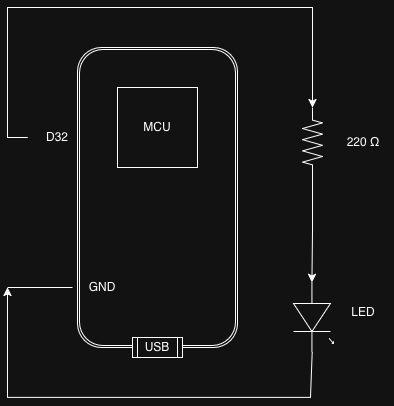
The 220 Ω resistor is a must, otherwise you will burn the LED.
To drive the LED to give us some kind of feedback - in this case, flashing at a specified interval - we need to code the board.
To have a feel of OOP, I separate the constants (PIN number, delay in flashing, etc) in a separate header file (01.hpp) and placed it under [project root]/include folder.
#ifndef BASICS_01_BASIC_BLINK_01_HPP

#pragma once

/* The pin number 32 depends on how you wire your LED to a digital GPIO pin on the ESP32.
   You can change it to any valid output-capable GPIO pin, as long as you update the wiring accordingly.
   Refer to your specific ESP32 board's pinout diagram to confirm the pin supports digital output.
   If you want to use the onboard LED, set ledPin to the board's built-in LED pin number (often GPIO 2 or GPIO 5).
*/
constexpr int ledPin = 32;
constexpr int delayTime = 300; // Delay time in milliseconds (1000 ms = 1 second)
#endifThe main file is saved as main.cpp under the [project root]/src folder.
NOTE: I use VSC + PlatformIO to manage my projects, so I follow the conventions implied by those tools.
#include <Arduino.h>
#include "01.hpp"

void setup() {
  // put your setup code here, to run once:
  pinMode(ledPin, OUTPUT); // Set the LED pin as an output
}

void loop() {
  digitalWrite(ledPin, HIGH); // Turn the LED on
  delay(delayTime); // Wait for the time defined by delayTime
  digitalWrite(ledPin, LOW); // Turn the LED off
  delay(delayTime); // Wait for the time defined by delayTime
}A runnable program shall have a setup function. As the name suggests, it runs once and only when the program launches.
Generally, all the init, setup, config routines are run here so that the program's "environment" is up and set.
All the regular behaviors of the program are coded here.
For such a simple program, I stick to the bare minimum requirement: no extra OOP code or unnecessary abstractions.
The logic of this program is simple:
- Turn on the LED connected to the pin defined by
ledPin. - Delay for
delayTimemilliseconds. - Turn off the LED.
- Delay for
delayTimemilliseconds. - Repeat from step 1.
We don't need to write an explicit loop using for or while to repeat the pattern, because loop() is called repeatedly by the ESP32 runtime.